Clone Your Deal (includes Video Tutorial)
How to Clone Your Deal:
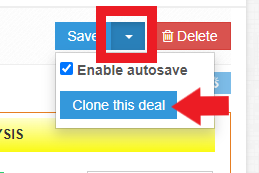
To clone your deal, towards the upper right-hand side of your deal analysis screen, you will see the blue save button with a little white arrow next to it. You'll want to click the white arrow and a drop-down will appear allowing you to select 'Clone this deal'.
We have included a screenshot below to assist with visual navigation and the short tutorial video link here: How to Clone Your Deal in Rehab Valuator