Vendor Information
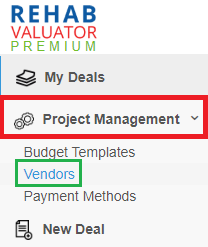
You are able to edit your Vendors list via the Project Management tab on the left-hand navigation panel.
Access your Vendors list by clicking "Project Management" and then "Vendors". This will display a list of all your saved vendors. To edit a vendor's information, click on the pencil icon to the right. Once you've made your edits, be sure to click the green check mark to Save.
I'm including some screenshots below to assist with visual navigation:
Click to Edit:
Click to Save: